Tools of the Trade: File permissions in Linux

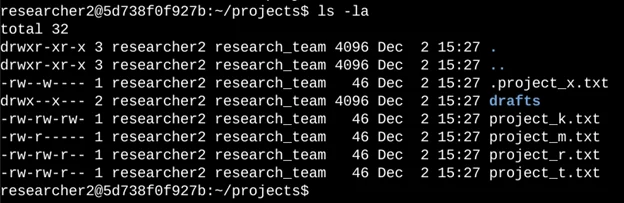
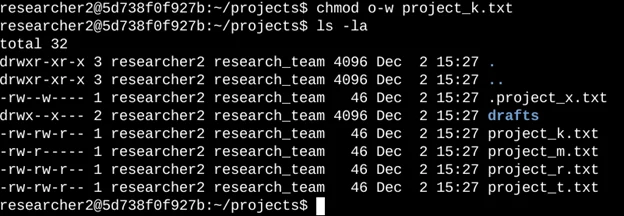
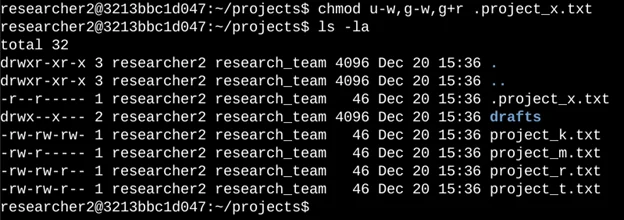
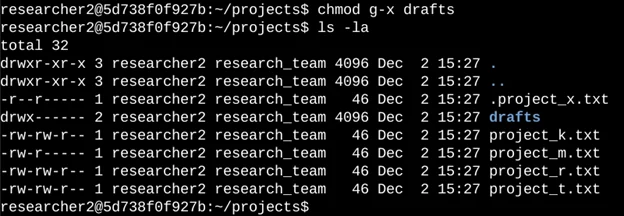
The following code demonstrates how I used Linux commands to determine the existing permissions set for a specific directory in the file system.
The first line of the screenshot displays the command I entered, and the other lines display the output. The code lists all contents of the project's directory. I used the ls command with the -la option to display a detailed listing of the file contents that also returned hidden files. The output of my command indicates that there is one directory named drafts, one hidden file named .project_x.txt, and five other project files. The 10-character string in the first column represents the permissions set on each file or directory.
The 10-character string can be deconstructed to determine who is authorized to access the file and their specific permissions. The characters and what they represent are as follows:
1st character: This character is either a d or a hyphen (-) and indicates the file type. If it’s a d, it’s a directory. If it’s a hyphen (-), it’s a regular file.
Linux File and Directory Permission Management 🞄 Ownership and Group-Based Access Control 🞄
Command-Line Tools: chmod, chown, ls -l, umask 🞄 Securing System Files and Logs 🞄 Practical Application of the Least Privilege Principle
Mastering file permissions in Linux reinforced my ability to secure operating systems at the foundational level.
This knowledge is directly applicable to real-world scenarios such as protecting sensitive data, auditing systems for misconfigurations, and maintaining secure environments in SOC and DevSecOps workflows.